
Problem
Bookkeepers and office managers spend hours a week typing supplier invoices and receipts into spreadsheets. AI can read documents, but a tool that quietly gets a number wrong is worse than typing it yourself, because nobody notices until the books don't balance.
What it does
- Drop the pile. Up to 50 files at once: PDFs, scans or phone photos. Pick invoices, receipts, or define your own fields for a form.
- Watch it read. Each document moves from queued to reading to "needs review" or "checks passed", live on the screen.
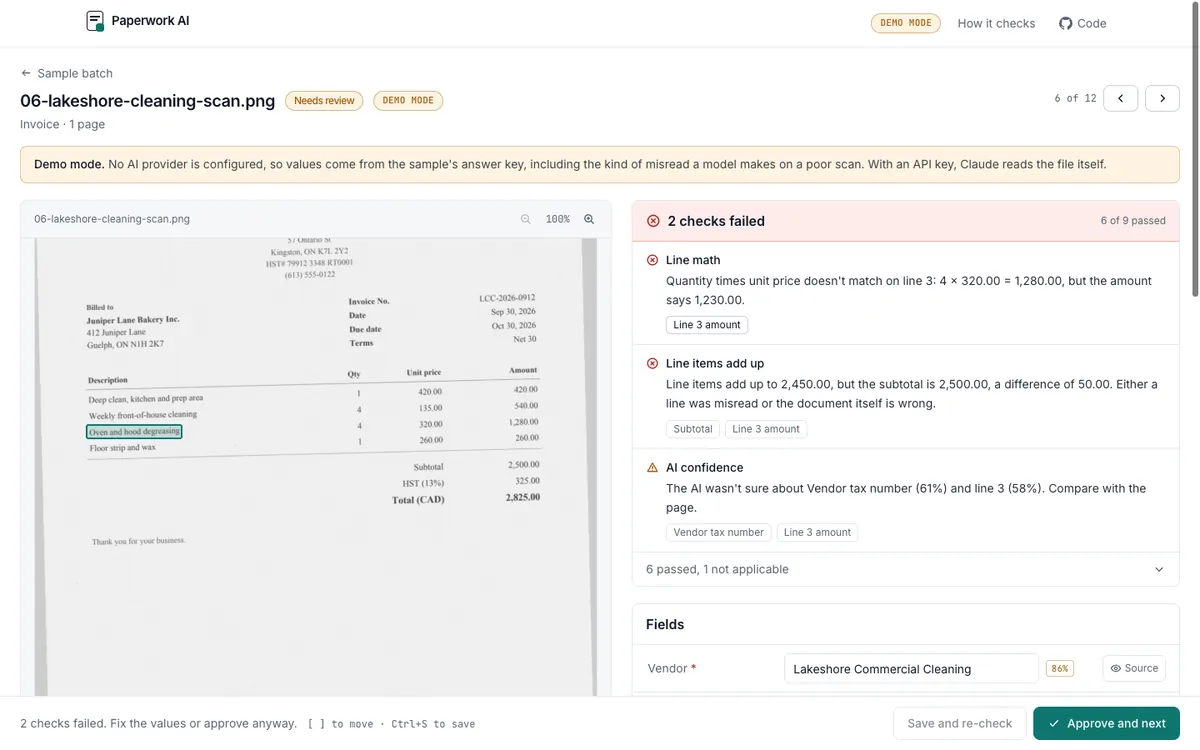
- Review side by side. The page is on the left, the fields, line items and taxes on the right. A Source button highlights the exact text each value came from.
- Fix and approve. Edit anything and the checks run again. Approve everything that passed in one click.
- Export. An Excel workbook, CSV per document or per line, a Google Sheets-ready CSV, or JSON.
How it helps your business
The AI does the reading, and a layer of checks does what a careful bookkeeper would do by hand:
- Line items add up to the subtotal, and the subtotal plus taxes adds up to the total.
- Each line's math (quantity times unit price) is right.
- Tax rates match Canadian GST, HST, PST and QST.
- Dates and currencies make sense, for example a due date before the invoice date, or a USD invoice whose total says CAD.
- Duplicates are flagged when the same supplier and invoice number come in twice.
- Every quoted value is really on the page, so an invented number shows up as a warning.
The AI is told to report what the page says and never to fix numbers, so a supplier's own arithmetic mistake surfaces instead of being quietly corrected.
Receipts mode for trades
Contractors and trades collect crumpled receipts in the truck all week. Receipts mode is built for that, on a phone:
- Snap a photo of each receipt, from the lumber yard, the fuel stop or the equipment rental.
- A suggested expense category for every line, such as Materials and supplies, Vehicle fuel or Equipment rental, with a short reason. The user can change it, and it is labelled as a suggestion for their bookkeeper or accountant, not tax advice.
- An optional job tag, so costs can be tracked per job.
- The same math checks as invoices, so a misprinted tax line or total is caught before anything is approved.
- Exports with a category column and a per-category summary sheet in the Excel workbook.
The categories come from a fixed list, and a rule-based categorizer backs up the AI and powers the demo, which uses three reproducible, fully fictional sample receipts.
Stack
A Python FastAPI backend with tests and an evaluation harness, and a Next.js frontend. Claude and OpenAI sit behind one interface through their official SDKs, and a demo mode needs no API keys.
Outcome
A working tool with twelve sample documents for a fictional bakery and three job receipts for receipts mode. The bakery set includes a crooked scan, a phone photo of a till receipt, and invoices with planted mistakes. In demo mode the checks catch all four planted document problems and the one deliberate misread, with no false alarms on the clean documents. Demo mode replays known answers, so those numbers show the checks working, not the quality of a particular AI model; the same harness scores a real model with an API key.